Lautnote
1.0In preparation for the Microsoft Store

Transcription & meeting notes for Windows 11Your conversations as text.On your PC.

Lautnote transcribes interviews, lectures, podcasts and meetings, recognizes who is speaking and summarizes. Without cloud, account or subscription.

  • 15 days with every feature, free
  • then €59 once
  • no account, no subscription
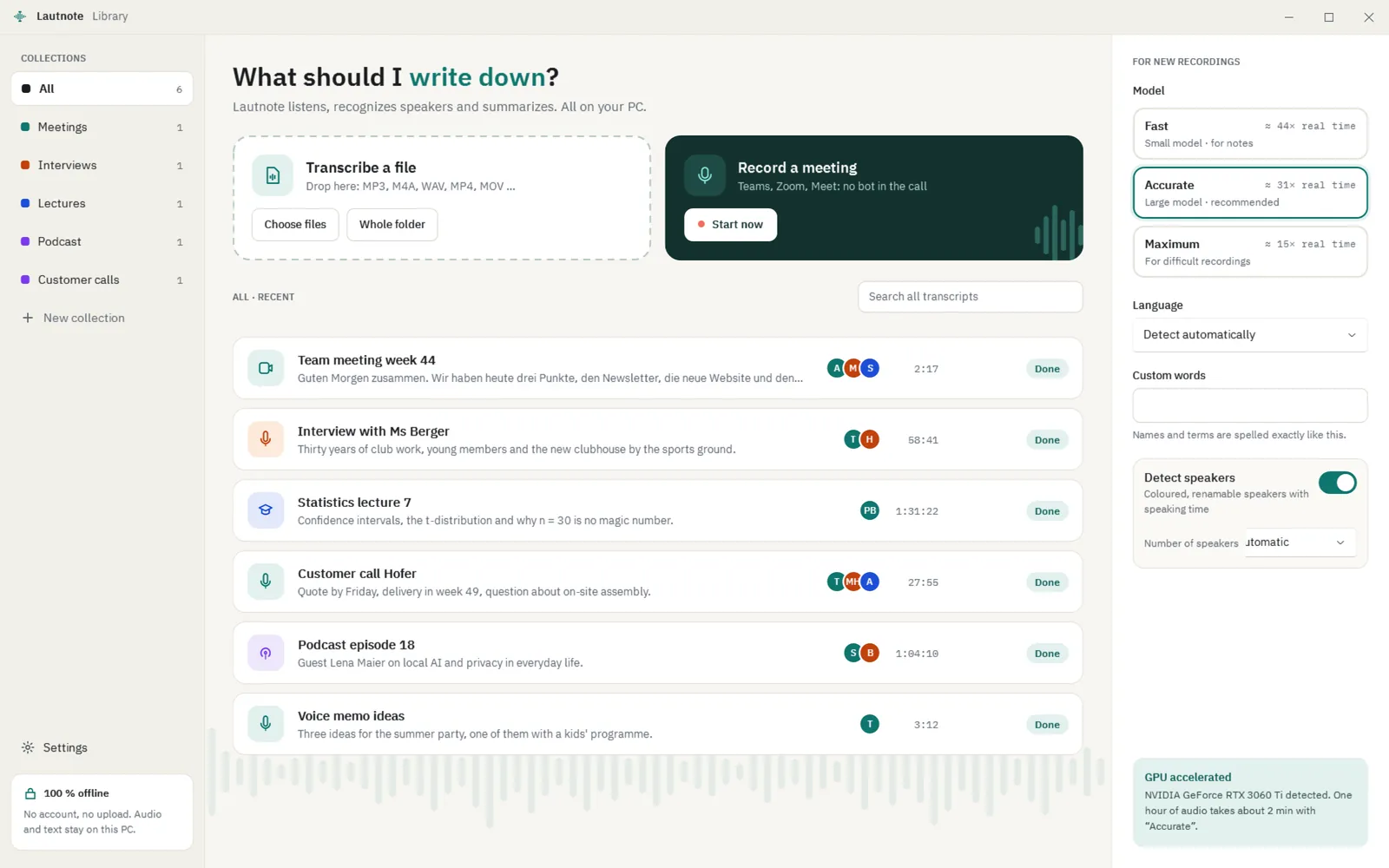
The Lautnote library with recent transcripts, model choice and the meeting button
The film is on its way. 45 seconds with sound and subtitles. Until then: the real app.
Coming soon
Lautnote · the filmReal screenshot from the app
  • Runs on your PC
  • No account, no telemetry
  • Buy once, no subscription
  • Windows 11
  • Made in Austria
One hour of audio
2–3 minwith “Accurate” and a graphics card
Summary of a 1-hour meeting
28–44 son the same graphics card
Without a graphics card
≈ 20 minper hour of audio with “Fast”
Live transcript
≈ 2 sdelay in meeting mode

Measured on 29 Oct 2026 on one PC: AMD Ryzen 5 3600, NVIDIA GeForce RTX 3060 Ti (8 GB), Windows 11. The test audio was clear synthetic speech; real recordings with echo, dialect or crosstalk can take longer. Lautnote measures the speed on your PC and shows it in the app.

(01)How it works

File in. Text out. Summary.

  1. 01

    File in

    Drop MP3, M4A, WAV, FLAC, OGG, MP4, MOV, MKV or WEBM into the window – or a whole folder. German and English are detected on their own.

  2. 02

    Text out

    With timestamps and speakers. Click a word and hear it; correct the text while you listen, at 1×, 1.5× or 2×.

  3. 03

    Summary

    A language model on your PC writes a short summary, decisions, tasks with owner and due date, and open points – each with a timestamp.

01Summary & questions

Every point has a timestamp.

One click and you hear the passage again. Ask your transcript – Lautnote answers only from what was said, and says so when the answer is not in it.

  • Templates for meeting, interview, lecture, podcast
  • Your own template with your own prompt
  • Runs on your PC, nothing is uploaded
Summary & questions

(02)Meeting mode

Meetings without a bot.

Record Teams, Zoom or Meet in the browser without anyone joining the call. Lautnote hears only the sound of the app you choose and your microphone.

02Live

Live transcript and your notes, side by side.

The transcript follows with about two seconds of delay. Next to it you write notes and set markers; both are saved with the transcript.

  • Only the sound of the chosen app – no system sounds
  • Your microphone as a separate track
  • Before every start you confirm that everyone knows
Meeting mode
01

Choose the app

Teams, Zoom or your browser for Meet. Known meeting apps are preselected.

02

Confirm consent

“All participants know notes are being taken” must be ticked, otherwise nothing starts.

03

Finish and transcribe

Afterwards Lautnote recognizes the speakers; the voice on your microphone track becomes “You”.

(03)Speakers

Who said what.

03Speakers & editor

Names, colours, speaking time.

Lautnote recognizes the speakers and gives each a colour and initials. Rename them, merge or split them, and see who talked how much.

  • Click a word – playback jumps there
  • Find and replace, undo
  • Your own words for names and terms
Speakers & editor

(04)Export

Take it anywhere.

Five formats for documents, notes and video. Search looks through all your transcripts at once.

Export, search and folders

(05)Comparison

Compared fairly. With sources.

How Lautnote differs from three well-known tools. Facts from the makers' own pages, checked on 29 Oct 2026. Prices change – the sources have the latest.

Lautnote compared with MacWhisper, Otter.ai and Buzz
FeatureLautnoteWindowsMacWhisperMacOtter.aiCloudBuzzOpen Source
Runs onWindows 11macOS, plus an iPhone/iPad app; no Windows version [1]Cloud service with web and mobile apps [2]Windows, macOS (Apple silicon), Linux [4]
Where speech becomes textOn your PCOn your Mac with local models; cloud AI providers optional [1]In the cloud; Otter uses providers such as Amazon Web Services for compute and storage [3]On your PC, offline with Whisper [4]
Price€59 once, 15-day free trialFree version; Pro €64 once [1]Basic free (300 min/month); Pro $16.99 per user/month, or $8.33/month billed yearly [2]Free, open source (MIT) [4]
MeetingsSound of one app plus your microphone as separate tracks, live transcript, no botRecords Zoom, Teams, Webex and more; no bot joins [1]Otter joins Zoom, Microsoft Teams and Google Meet to take notes [2]Live transcription from the microphone [5]
SpeakersDetected, with names, colours and speaking timeDetected and labelled [1]Speaker identification [2]Speaker identification [4]
SummaryLanguage model on your PC; every point with a timestampAI features with your own API keys or local models (Ollama, LM Studio) [1]Automated summaries and AI chat [2]No summary feature listed [4]
ExportTXT, Markdown, DOCX, SRT, VTTSRT, VTT, TXT, Markdown, PDF, HTML, DOCX [1]TXT; DOCX, PDF and SRT from Pro [2]TXT, SRT, VTT [4]

Where the others are ahead: MacWhisper has a free version and more export formats, Otter works across devices and teams, and Buzz is free and also runs on macOS and Linux. Lautnote is for Windows users who want meetings, speakers and summaries on their own PC for a one-time price.

  1. MacWhisper – official website (features, Free and Pro prices)
  2. Otter.ai – pricing (plans, minutes, features, export)
  3. Otter.ai – privacy policy (cloud providers for compute and storage)
  4. Buzz – project page on GitHub (licence, platforms, features, export)
  5. Buzz – official website (Buzz Classic, live transcription)

Checked on 29 Oct 2026

MacWhisper alternative for Windows

(06)Privacy

Everything stays on your PC.

Not a promise in small print – this is how Lautnote is built. Here is what goes online, and when.

Local.

Audio, transcripts, notes and summaries are processed and stored on this PC. Nothing is uploaded.

No account.

No sign-up, no telemetry, no tracking in the app. Your Microsoft account is enough for the purchase.

Online only when needed.

Models are downloaded once from Hugging Face, only after you agree. The licence is checked through the Microsoft Store.

Where Lautnote keeps your data and which connections it makes
WhatWhere or when
Recordings, transcripts, notes, summariesIn the app folder on your PC: %LOCALAPPDATA%\Packages\Deskscene.Lautnote_7baf292wdw0j6\LocalState (Store version). Settings › Models and storage opens it.
Speech modelsSame folder, downloaded once per model after you agree: from huggingface.co and its download servers (*.cdn.hf.co, cas-bridge.xethub.hf.co), each file checked with SHA-256.
Licence (trial, purchase)Microsoft Store through Windows, at start and when you buy. Without internet, the last known licence applies.

Privacy policy

(07)Guides

Concrete answers to real tasks.

All guides

(08)Price

15 days to try. Then buy once.

  1. Day 1–15

    Everything, free

    Every feature through the Microsoft Store trial. No account with us, no card.

  2. Then

    You decide

    Buy once for €59 – or don't.

  3. Always

    Your transcripts stay yours

    Open, search and export keep working, with or without a licence.

15 days free

One price

Lautnote

€59one-time, no subscription
  • Everything included:
  • Transcription, speakers, editor
  • Meeting mode without a bot
  • Summary and questions on your PC
  • Export as TXT, Markdown, DOCX, SRT, VTT
  • All 1.x updates included
What works during the trial and with a licence, and what works without a licence
FeatureTrial & licenceWithout licence
Open, search and export transcriptsYesYes
Correct text and speakersYesYes
New transcriptions (files, folders, drag and drop)YesNo
Record meetingsYesNo
Detect speakers afterwardsYesNo
Create summariesYesNoSaved summaries stay visible
Ask your transcriptYesNo
Watched foldersYesNoNew files are remembered and transcribed after you buy

Sold by Microsoft through the Microsoft Store; payment and licence run through your Microsoft account. Store prices include VAT, and the Store shows the price in your currency.

(09)FAQ

Questions before you buy.

Am I allowed to record a meeting or conversation?

Before every meeting recording, Lautnote asks you to confirm that all participants know notes are being taken – without the tick, nothing starts. Whether you may record depends on the country and the situation; in many places recording a conversation without the consent of everyone involved is not allowed.

Say it at the start and ask for consent, for example: I'd like to record this meeting with Lautnote to write the notes. The recording stays on my computer and is not uploaded. Is that okay for everyone?

This is not legal advice. For recordings at work, in research or with customers, have a professional (for example your data protection officer) check it briefly.

Which PC do I need?

Windows 11, version 22H2 or later, 64-bit, with at least 8 GB of memory and 3 GB of free space for the models (Fast and summary). Recommended: a graphics card with Vulkan support and at least 6 GB of video memory, 16 GB of memory and 8 GB of free space for all models. Windows N editions need the Media Feature Pack to import audio and video.

Graphics card or processor?

Both work. With a graphics card (Vulkan), an hour of audio takes about two to three minutes with “Accurate” on our test PC (RTX 3060 Ti). Without a graphics card, “Fast” is the default and takes about 20 minutes per hour of audio on a 6-core processor; “Accurate” is slower than real time there. Lautnote measures the speed on your PC and shows it next to each model.

Does Lautnote work offline?

Yes. Once the models are on your PC, transcription, speakers, summary, questions, search and export run without internet. Lautnote only goes online to download a model (after you agree) and to check the Store licence; without internet the last known licence applies.

Where is my data?

On your PC only, in the app folder (Store version: %LOCALAPPDATA%\Packages\Deskscene.Lautnote_7baf292wdw0j6\LocalState). Settings › Models and storage shows the folder and lets you remove models. There is no account and no cloud copy, so back up the folder yourself if the recordings matter.

What happens after the 15 days?

Without a licence you can still open, search and export your transcripts and correct text and speakers. New transcriptions, meeting recordings, speaker detection, summaries, questions and watched folders need the licence. Saved summaries stay visible; files that arrive in watched folders are remembered and transcribed after you buy.

Which languages does Lautnote understand?

We test and advertise German – including Austrian and Swiss German – and English. Lautnote detects the language on its own, or you set it. Whisper knows more languages; they may work, but we have not tested them. The app itself is in German and English.

How big are the models?

Speech: “Fast” 181 MB, “Accurate” 547 MB, “Maximum” 1,031 MB. Speakers: 31 MB. Summary and questions: 4.7 GB on PCs with at least 8 GB of video memory, otherwise 2.3 GB. Each model is downloaded once, only when you first need it and after you agree.

Try it for 15 days.

Every feature, no account, no card. After that, your transcripts stay yours – open, search and export keep working.

  • Made in Austria
  • No telemetry, no account
  • Payment and licence via Microsoft

€59 once · all 1.x updates included